.webp)

Claude can answer security questionnaires. Paste in a question about your encryption standards, your incident response process, or your SOC 2 controls, and you will get a coherent, well-structured response in seconds.
That part works. The question is what happens after that first question.
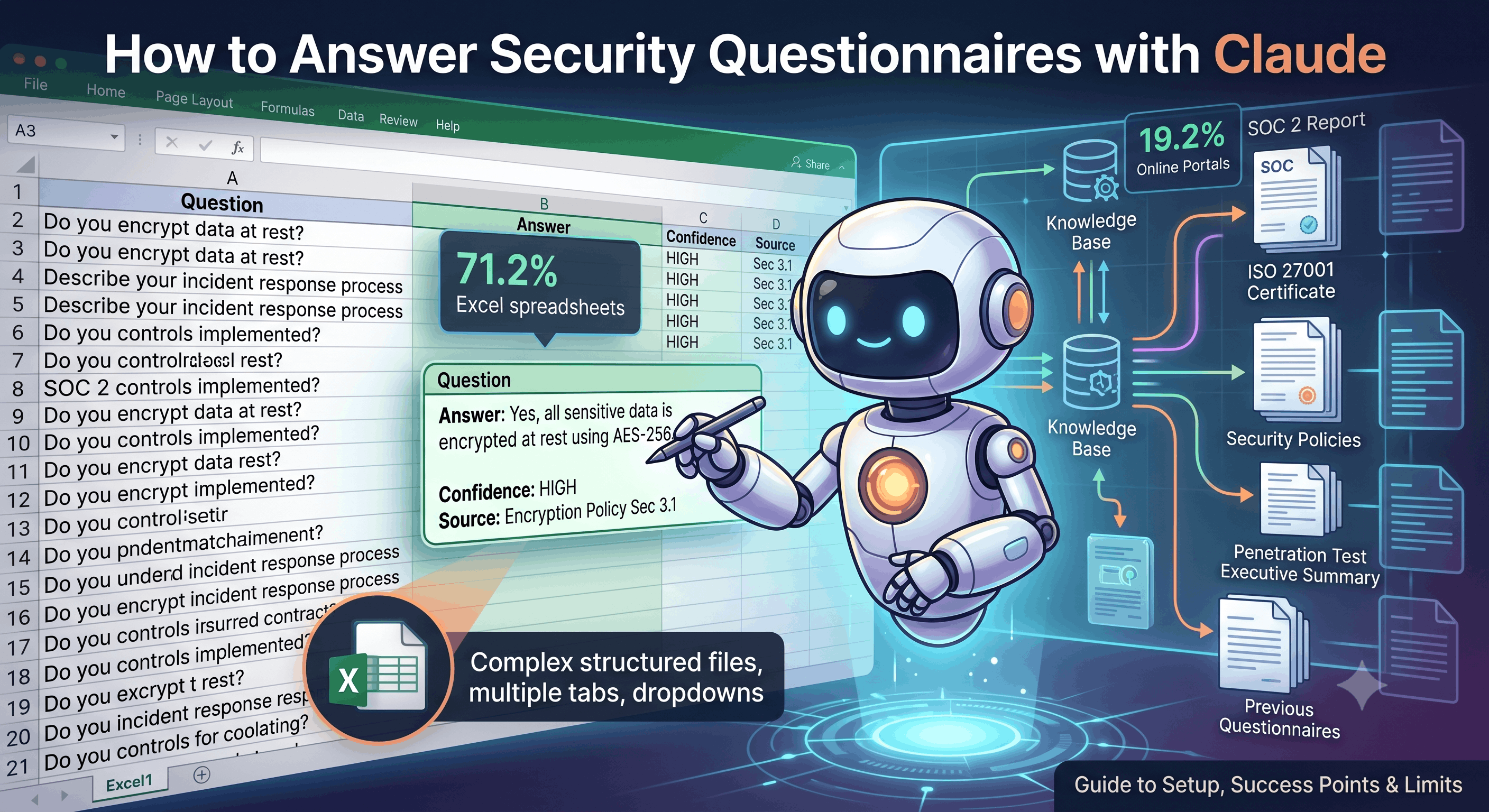
Security questionnaires are not just questions. From Skypher's data on 100,000+ processed questions: 71.2% arrive as Excel spreadsheets with structured tabs, macros, and dropdowns. Another 19.2% come through online portals like OneTrust or ServiceNow. Only 9.6% are Word documents. The actual work is not writing answers. It is extracting questions from structured files, maintaining consistency across responses, and getting answers back into the format the customer expects.
Most teams that try Claude for security questionnaires go through the same arc: initial excitement, a few successful one-off answers, then a slow realization that answering individual questions was never the hard part. The hard part is everything around it.
This guide covers how to set up Claude for security questionnaire work, where it performs well, and the five specific points where the approach stops working for most organizations.
How to Set Up Claude for Security Questionnaire Response
You have three options depending on your tooling: Claude.ai Projects (browser-based, easiest), Claude Code (terminal-based, more control), or the API (programmatic, most flexible). The core approach is the same for all three.
Step 1: Build Your Knowledge Base
Collect every document you would normally reference when answering a security questionnaire. The more specific and current your documentation, the better Claude's answers.
Must-have documents:
- SOC 2 Type II report (most recent)
- ISO 27001 certificate and Statement of Applicability (if certified)
- Security policies: access control, incident response, data protection, encryption, business continuity, disaster recovery
- Penetration test executive summary (most recent)
- Data Processing Agreement (DPA) template
- Previously completed questionnaires (the more, the better, these are your best source for tone and answer structure)
Good to include:
- Architecture diagrams and data flow documentation
- Vendor/subprocessor list
- Employee security training records or policy
- Physical security documentation
- Insurance certificates (cyber liability, E&O)
In Claude.ai, create a Project and upload these files to the Project Knowledge. In Claude Code, put them in a dedicated folder (e.g., ~/security-kb/). Important: if you are on a paid Claude plan, go to Settings and verify that "Improve Anthropic's models" is turned off before uploading company documents.
Step 2: Set Your Project Instructions
This is the most important step. A generic prompt like "answer these security questions" will produce generic, unreliable output. The prompt below is designed specifically for security questionnaire response work.
Copy this into your Claude.ai Project Instructions, or save it as a CLAUDE.md file for Claude Code:
Security Questionnaire Response Instructions

You answer security questionnaires for [YOUR COMPANY NAME]. This is a grounded retrieval task. Every answer must come from the documents in this project. Do not use your general training knowledge to fill gaps.

Source priority (use in this order):
1. Previously completed questionnaires (best source for tone, structure, and approved phrasing)
2. Security policies and certifications (SOC 2, ISO 27001, pen test reports)
3. Technical documentation (architecture docs, data flow diagrams, DPA)

If two sources conflict, flag the conflict. Do not pick one silently.

Answer format for each question:
- Answer: [your response]
- Confidence: HIGH | MEDIUM | LOW | GAP
- Source: [filename, section or page]

Confidence definitions:
- HIGH: directly supported by exact text in a source document
- MEDIUM: supported by related content that required light synthesis across documents
- LOW: loosely supported, needs human review before submission
- GAP: no supporting evidence found. Do not attempt an answer. Write "Requires SME input" and suggest who might own this answer (Security, Legal, Engineering, IT, HR)

Hard rules (never violate these):
- Never invent or assume certifications, attestations, or audit dates
- Never fabricate security controls, encryption standards, or key management details
- Never guess data residency, hosting locations, or subprocessor details
- Never answer "Yes" to a capability question without explicit source evidence. Default to GAP.
- Never paraphrase technical specifics. If your SOC 2 says "AES-256 at rest, TLS 1.3 in transit," write exactly that, not "industry-standard encryption"
- Never use information from one customer's questionnaire to answer another customer's questions

Multi-product handling:
If [YOUR COMPANY NAME] sells multiple products, the first question before answering any questionnaire is: which product is this about? Ask the user to confirm the product before drafting. Answers about encryption, data residency, retention periods, access controls, and hosting may differ between products. Never combine answers from different products into one response.

Evidence requests:
When a question asks you to "attach," "provide," or "reference" a document (e.g., "Please attach your most recent SOC 2 report"), do not attempt to reproduce the document content. Instead, write: "Evidence: [document name] -- to be attached separately" and add it to an Evidence Tracker at the end of the output listing every requested attachment.

When to pause and ask:
Do not guess. Pause and ask before answering if:
- A question is ambiguous and could be answered multiple ways
- The question requires a commercial decision (SLA commitment, insurance limits, contractual terms)
- Source files contradict each other on a material point
- The question asks about a capability you cannot confirm from any source document

Self-correcting context file (Claude Code only):
Maintain a file called session_context.md in the project folder. When I correct an answer or flag an error, add the correction to this file so you do not repeat the mistake. Examples: "The CTO email is jb@company.com, not security@company.com" or "Our data retention for Product X is 90 days, not 12 months." Before answering any question, re-read session_context.md. Over time, this file becomes your error log and reduces hallucinations without requiring changes to the knowledge base.

Date filtering:
Check the date metadata on source documents. Do not use completed questionnaires older than 12 months as answer sources. If the most recent source for a question is older than this threshold, flag it as potentially stale and mark confidence as LOW.

For standard framework questionnaires (CAIQ, SIG, SIG Lite):
- Use the exact response codes the framework expects. CAIQ uses Yes/No/N/A. SIG uses Yes/No/N/A/Compensating Control. Do not invent response codes.
- Do not add narrative to fields that expect only a code
- Mark N/A only when the control category genuinely does not apply to your service model, and add a one-line explanation

Output:
- Preserve the original question numbering and section structure
- At the end, produce a Gap Summary listing every LOW and GAP item with the question text and suggested owner
- At the end, produce an Evidence Tracker listing every document requested for attachment
Step 3: Process Your First Questionnaire
Start with a questionnaire you have already completed manually. This lets you compare Claude's answers against known-good responses and identify where your knowledge base has holes.
If you want a test questionnaire to practice with, download the CAIQ (Consensus Assessments Initiative Questionnaire) for free from the Cloud Security Alliance website. The SIG and SIG Lite from Shared Assessments are also common frameworks but require a membership to access.
For Claude.ai Projects: Upload the questionnaire file to the conversation. If it is an Excel file, Claude can read it but cannot write answers back into the original format. You will need to copy answers manually. Prompt: "Please answer this CAIQ questionnaire using only the project knowledge. Follow the answer format in the project instructions."
For Claude Code: Place the questionnaire file in your working directory. Prompt: "Read the questionnaire in caiq_v4.xlsx. Answer each question following the instructions in CLAUDE.md. Save the results as caiq_completed.xlsx." Claude Code can write Excel files, which gives you a more complete workflow than the browser.
What to Expect on Your First Run
Your first run will not produce a finished questionnaire. Set expectations accordingly.
Based on publicly shared results from teams using Claude for CAIQ and SIG questionnaires with a reasonably complete knowledge base:
- 70-80% of questions get a HIGH or MEDIUM confidence answer. These are your standard security controls, policies, and certifications that map directly to your documentation.
- 15-25% of questions come back as GAP. These are areas where your documentation is missing detail, where the question requires product-specific technical knowledge your policies do not cover, or where the answer involves commercial terms (SLAs, insurance limits, contractual commitments) that are not in your security docs.
- 5-10% of questions get LOW confidence answers that need careful human review. These are the dangerous ones. Claude found something related but had to stretch. Review these more carefully than the gaps, because a wrong answer that looks right is worse than no answer.
Processing time for a 300-question CAIQ: roughly 15-25 minutes in Claude Code, longer in Claude.ai depending on context window management. One security engineer who has used Claude Code for questionnaires for over ten months reports that the fifteen-minute wait is worth it: "I'd rather it takes fifteen minutes and gives me something solid than get a fast answer I have to rewrite." Be aware that large questionnaires can consume a significant portion of your daily Claude usage limit on the Pro plan.
The gap rate drops with each subsequent questionnaire as you add more completed questionnaires to your knowledge base. By your third or fourth questionnaire of the same type, you should see fewer gaps as the knowledge base covers more ground.
Step 4: Improve Your Knowledge Base After Each Run
The gap summary from each run tells you exactly what documentation to add. This is the most important ongoing step:
- Review every GAP item. For each one, either add the missing documentation to your knowledge base or write a manual answer and add it to a "past questionnaires" folder.
- Review every LOW item. If Claude was wrong, correct it and save the corrected questionnaire as a source for future runs.
- Review MEDIUM items selectively. Some will need tightening. Others will be fine.
After 3-5 completed questionnaires are in your knowledge base, Claude's performance on standard security questions stabilizes. If you use the self-correcting context file from the prompt above, accuracy improves further: each correction you log prevents the same mistake on every future questionnaire. One practitioner reports reaching 98-99% accuracy after ten months of accumulated corrections. Your remaining gaps will be structural: questions about specific product implementations, customer-specific configurations, or topics that change frequently (vendor lists, personnel, recent incidents).
Where Claude Works for Security Questionnaires
With the setup above, Claude handles certain scenarios well:
Single expert who knows the material. The ideal Claude user for security questionnaires is someone who knows their ISMS, their SOC 2, and their security controls well enough to spot a wrong answer on sight. If that describes you and you handle questionnaires solo, Claude becomes a first-draft machine that you review and correct. Over time, your corrections accumulate in the context file and accuracy climbs. Some practitioners build client-specific instruction files so Claude handles recurring customers with their particular nuances.
Standard security questions with clear documentation. Questions like "Do you encrypt data at rest?" or "Describe your incident response process" that map directly to a policy document. Claude finds the relevant section and rephrases it accurately.
Repeat questionnaires from the same framework. Your second CAIQ is faster than your first. Your fifth SIG Lite is mostly automatic. The knowledge base compounds.
Ad-hoc questions from prospects. A sales engineer gets a one-off question via email: "Does your platform support SAML SSO?" Claude answers it in 30 seconds from your documentation.
For a small team with a manageable volume of questionnaires arriving as simple documents, this approach can work for months.
Five Limits You Will Hit Using Claude for Security Questionnaires
The problems show up as volume increases, as more people get involved, or as questionnaires arrive in formats other than plain text.
1. Claude Struggles with Real Questionnaire File Structure
Security questionnaires are not lists of questions. They are structured documents.
A typical Excel questionnaire has multiple tabs, question columns, answer columns, guidance columns, dropdown menus (Yes/No/N/A with conditional logic), macro-protected cells, and fields for evidence document references. Some have 900+ questions across 15 tabs.
Claude can read Excel files. Claude Code can write to them using Python. On a simple, cleanly structured spreadsheet, this works. But real-world questionnaire files are rarely simple. Claude often misidentifies which column contains questions versus guidance versus existing answers. It cannot respect dropdown constraints or macro-protected cells. When it writes answers back to the file, conditional formatting, merged cells, and dropdown validation are frequently broken.
In practice, teams using Claude Code for Excel questionnaires report spending significant time on cleanup: fixing answers that landed in the wrong column, re-applying formatting the customer expects, and manually handling sections where Claude misread the structure. For straightforward single-tab questionnaires, Claude Code handles the round-trip reasonably well. For the complex multi-tab files that large enterprises send, the cleanup cost reduces the time savings.
2. Source Citations Are Not Verifiable
The prompt above instructs Claude to cite its sources, and Claude will. It will tell you "Source: SOC 2 Type II Report, Section 4.2." The problem is that you cannot verify this. There is no way to click the citation and see the highlighted paragraph in the original document. Claude sometimes attributes an answer to the wrong document, or synthesizes from general knowledge while claiming it came from your files.
This matters because security questionnaire answers carry legal weight. If a customer asks "Have you had a security breach in the past 24 months?" and Claude says "No" citing your SOC 2 report, but the answer actually came from an outdated policy document that predates your most recent incident, you have a liability problem. You would only catch this by manually checking every citation against the source, which defeats the purpose of automation. Even experienced practitioners who say they do not need source tracing still generate a separate source report alongside their completed questionnaires, "just in case" they need to verify why Claude answered a particular way.
Purpose-built tools solve this by linking each answer to the exact source paragraph with visual highlighting. You can click any answer and see the original text it was derived from. The difference is between Claude saying "I got this from your SOC 2" and a tool showing you the specific paragraph it used.
3. Online Portal Questionnaires Are Invisible to Claude
Nearly one in five security questionnaires arrives through an online portal like OneTrust, ServiceNow, ProcessUnity, or Archer. These are web-based forms where you log into the customer's portal and answer questions directly in their system.
Claude cannot interact with these portals. You cannot paste an entire OneTrust questionnaire into Claude because the questions are rendered dynamically in a web interface, often with branching logic that reveals new questions based on your previous answers.
Organizations that handle significant portal volume (one enterprise security team reported that roughly half their 1,500 annual questionnaires come through portals) need tools with browser extensions that can import questions from portals, run them through AI, and push answers back. Claude has no mechanism for this.
4. Multi-User Consistency Breaks Down
When one person uses Claude, they develop a rhythm. They know which documents to reference, how to phrase the system prompt, and how to review the output.
Claude.ai Projects can be shared with team members, which helps: everyone uses the same prompt and the same uploaded documents. That solves the "different system prompts" problem. In Claude Code, the workaround is sharing your instruction files: you hand a colleague your folder of .md files and they open a new session with the same context. It works, but the setup is fragile. If two people make corrections to their own context files independently, the files diverge and answers start to differ. What neither approach solves is answer routing by product line.
When your company sells multiple products, the answer to "Do you support role-based access control?" or "What is your data retention period?" depends on which product the questionnaire is about. One product retains data for 90 days, another for 12 months. Claude does not know which product is being assessed unless the user specifies it every time, and there is no mechanism to enforce this across a team.
As one GRC director put it during a vendor evaluation: the goal is "making sure we're answering the questions in the same way, with responses that both the owners of those areas and legal are going to be okay with."
5. Maintenance and Scale
The DIY Claude setup works until it does not. Common breaking points:
Knowledge base drift. Your SOC 2 report gets updated. Your incident response policy changes. Your cloud provider migrates regions. Unless someone manually updates every document in your Claude knowledge base, answers start going stale. There is no notification system, no expiration dates, no automated sync with your SharePoint or Confluence.
Model updates. Claude's behavior changes between model versions. An answer format that worked with one version may produce different output with the next. Dedicated platforms benchmark each model update against compliance-specific questions before switching defaults.
Volume math. At 25 questionnaires per year, the Claude workflow is manageable. At 100+, the cumulative time spent on cleanup, review, and manual coordination starts to outweigh the drafting time saved. At 500+, you need workflow automation (assignment, review, approval, export) that Claude cannot provide.
How Purpose-Built Security Questionnaire Tools Use AI Differently
The tools built specifically for security questionnaire automation do not skip AI. Many of them use Claude or GPT as part of their architecture. The difference is what sits around the AI.
A well-designed system uses two layers. The first layer is a retrieval model, trained specifically on security and compliance questions, that searches your knowledge base, documents, and previous questionnaires to find the most relevant existing answers. It does not generate anything.
The second layer, often Claude or GPT, only activates when the first layer finds relevant content with high confidence. It rephrases and combines that retrieved content into a coherent answer. If the retrieval layer finds nothing relevant, the generative layer never fires. This architecture prevents hallucination structurally rather than relying on prompt instructions.
On top of this, purpose-built tools handle the parts Claude cannot: parsing Excel files with their actual structure (tabs, macros, dropdowns), importing and exporting from online portals, assigning individual questions to subject matter experts via Slack or Teams, maintaining versioned knowledge bases that sync with SharePoint or Confluence, and tracking which source document supports each answer.
Adobe's security team used to spend two weeks per questionnaire. With Skypher, a purpose-built platform using this two-layer architecture, they complete them in two hours with the same team. Deel and McKinsey use the same system. The 96% accuracy rate comes from the retrieval layer preventing the generative AI from guessing.
How to Answer Security Questionnaires with ChatGPT, Gemini, or Copilot
Everything in this guide applies to ChatGPT and Gemini with the same limitations. They are general-purpose language models without questionnaire-specific infrastructure. The setup process is nearly identical: upload your security documentation, write a system prompt, paste questions, review answers.
The five limits described above (file parsing, source traceability, portal integration, multi-user consistency, and maintenance at scale) apply regardless of which model you use.
Microsoft Copilot is a common alternative that enterprise teams try first, given its integration with the Microsoft ecosystem. Multiple organizations have reported spending 6-12 months attempting to build Copilot-based questionnaire workflows before concluding the tool was not designed for this use case. The gap is the same: Copilot can draft text, but it cannot parse structured questionnaire files, maintain a versioned compliance knowledge base, or interact with third-party risk management portals.
Claude vs. Dedicated Security Questionnaire Tools
Use Claude directly if:
- Your volume is under 25-50 questionnaires per year
- One person handles all questionnaires
- Most arrive as simple documents (not portals)
- You sell one product (no multi-product answer variations)
- You are comfortable reviewing every answer manually
Consider a dedicated platform if:
- Volume exceeds 50 questionnaires per year or is growing
- Multiple people need to collaborate on responses
- A significant share of questionnaires comes through online portals
- You sell multiple products with different security configurations
- You need source traceability for audit purposes
- Your team is shrinking while questionnaire volume is increasing
Claude is the AI in both cases. The difference is whether it runs as the entire system or as one component inside a system built for this specific job.
Frequently Asked Questions About Claude for Security Questionnaires
Can Claude achieve the same accuracy as dedicated security questionnaire tools?
Claude's accuracy depends entirely on what you upload to it and how you prompt it. With thorough documentation and careful prompting, it can produce accurate individual answers. Where accuracy drops is at scale: inconsistent prompts across users, outdated documents, and the absence of a confidence threshold that prevents low-quality answers from being auto-accepted. Dedicated tools address this with retrieval models trained specifically on security and compliance questions that score confidence before generating any answer.
How long does it take to set up Claude for security questionnaires versus a dedicated tool?
Claude setup takes an afternoon: gather your documents, write a system prompt, run a test questionnaire. A dedicated tool typically takes one to two days for onboarding (uploading documents, configuring product structures, connecting integrations). The setup difference is small. The ongoing operational difference is where they diverge.
Is it safe to paste security questionnaire content into Claude?
Claude processes data according to Anthropic's data usage policies. For enterprise use, Anthropic offers API access with zero data retention. If your organization has strict data handling requirements (GDPR, DPA, specific contractual obligations about where data is processed), verify that your usage tier and configuration meet those requirements before uploading customer-facing security information.
Can I build a Claude Code skill for security questionnaires instead of buying a tool?
Yes, and several guides exist for this approach. A Claude Code skill adds structure: a local knowledge base, confidence scoring, and human-in-the-loop review. This gets you further than raw Claude prompting. The gaps that remain are format handling (Excel structure, portals), team collaboration (assignment, approval workflows), and long-term maintenance (knowledge base sync, model version management). Whether those gaps matter depends on your volume and team size.
What is the cost difference between Claude and a dedicated tool?
Claude API costs for security questionnaire work typically run $50-200 per month depending on volume and context window usage. Dedicated platforms range from $5,000 to $25,000+ per year depending on questionnaire volume. The cost comparison changes when you factor in the human time spent on manual extraction, formatting, portal work, and answer consistency review that a dedicated tool automates.